Losing your QID is stressful but fixable. Your lost Qatar ID stops you from accessing healthcare, banking, and travel in Qatar. Every year, thousands of expats and residents face this. The Ministry of Interior Qatar (MOI) offers clear ways to replace and report your card fast. Using Metrash2 or portal.moi.gov.qa, you can start your Residence Permit Services request quickly. Acting fast also prevents identity fraud. This 2026 guide walks you through every step from reporting to receiving your new QID accurately and simply.
Disclaimer
Editorial Notice: The procedures, fees, and timelines outlined in this guide are based on official MOI Qatar sources and are accurate as of May 2026. As government policies are subject to revision, readers are advised to verify current requirements directly at moi portal or contact MOI Qatar on 2366666 prior to proceeding.
Why Does Your Qatar ID Matters?
Your QID is your most important document in Qatar. Without it, you cannot access Hamad Medical Corporation hospitals or get medical care. You cannot open or use accounts at Qatar National Bank or other banks. Boarding flights at Hamad International Airport also becomes impossible. It proves you are a legal resident in Qatar. Every employer, government office, and service provider asks for it. Losing your Qatar ID affects your daily life instantly. That is why reporting a lost Qatar ID fast and starting the replacement process matters so much.
View our video guide by clicking the below image
First Actions to Take When Your Qatar ID Goes Missing
Losing your Qatar ID requires fast action. Every minute counts to prevent identity fraud and protect your accounts. The MOI has a clear process to follow. These five steps will guide you immediately after discovering your lost QID.
1. File an Official Police Report
Go to your nearest police station in Qatar right away. Tell them your QID is lost and provide your full details. They will give you an official loss report number. Keep this number safe. You will need it for your replacement QID application later.
2. Flag Your ID as Lost on the Metrash App
Open the Metrash2 app on your phone immediately. Download it free from Google Play Store or Apple App Store if not installed. Log in using your QID number and PIN. Go to the Residency section. Check your ID status and flag it as lost. This is the fastest official digital option available in Qatar.
Always use the latest updated version of Metrash2 for accurate results.
3. Protect Your Bank Accounts Right Away
Contact your Qatar National Bank or any bank immediately. Inform them your QID is lost. Request a temporary account freeze if needed. Also notify your employer or PRO right away. This protects you from identity fraud and unauthorized financial transactions linked to your lost card.
Contact your bank directly for their specific security protocol regarding a lost QID.
4. Hold Off on Any Travel Plans
Do not attempt to travel without your QID. Your card is required at Hamad International Airport for boarding. Without it, airline check-in will be denied. Keep your passport with you at all times as an alternate identity document until your replacement QID arrives.
5. Begin Your QID Replacement Application
Begin your replacement QID application immediately after reporting. Use Metrash2 under Residency then select Replace Lost ID. You can also visit portal.moi.gov.qa and go to Residence Permit Services. Keep your loss report number, passport, and a passport-size photo ready. The standard replacement fee is QR 200 as per MOI Qatar.
Qatar ID Replacement Fee — What You Need to Pay
Knowing the replacement fee before you apply saves time. The MOI Qatar charges a standard QR 200 fee to replace a lost QID. An extra QR 20 applies if you choose Qatar Post home delivery. Always confirm the latest fees at portal.moi.gov.qa before paying.
Accepted Payment Methods for QID Replacement
The MOI Qatar accepts credit card and debit card payments only for lost QID replacement. This applies both online via Metrash2 and at the MOI Service Center in person. Cash payments are not accepted at service centers. You can also pay using the e-wallet option inside the updated Metrash2 app. Always save your payment receipt as proof of transaction.
When Fees May Differ or Be Waived
Currently, MOI Qatar does not publicly advertise a general fee waiver for lost QID replacement. However, fees may differ based on your residency status or sponsorship type. Citizens of Qatar may have different fee structures compared to expats. If your card was stolen and you have an official police report, check with MOI Qatar directly. Your employer or PRO can also assist in verifying your specific case.
How to Report a Lost QID Through the MOI Qatar Portal?
The MOI Qatar website is available 24/7. It is one of the easiest ways to report your lost Qatar ID without visiting an office. You only need your 11-digit QID number and basic details to begin. Follow these seven steps carefully.
Step 1: Open the MOI Qatar Official Website
Open any browser on your phone or computer. Go to the official MOI Qatar website. Make sure you are on the correct government website. Do not use third-party sites for this process.
Step 2: Go to the MOI forms section
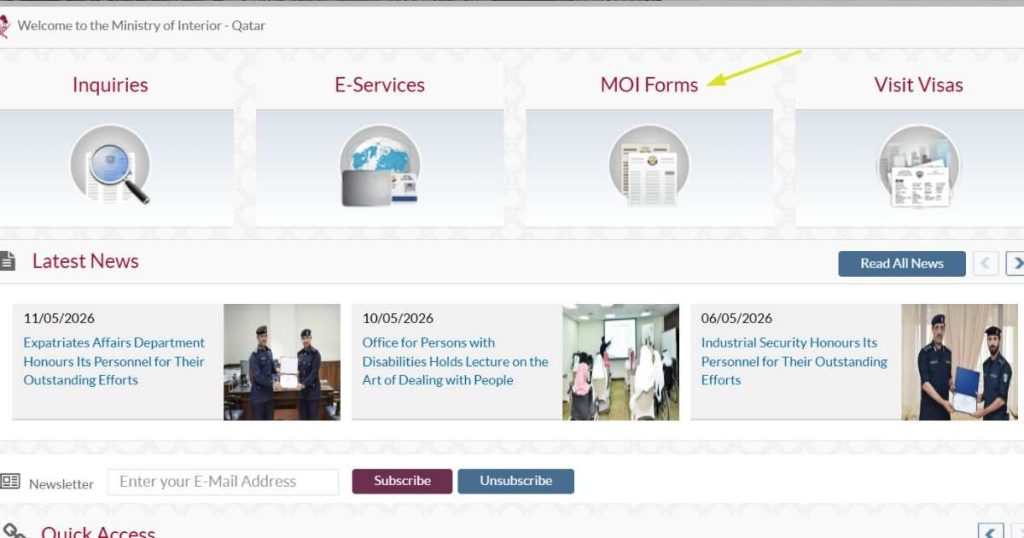
On the homepage, look at the top navigation menu. Click on “MOI forms“. This section gives you access to all official MOI Qatar digital services including residency and ID-related requests.
Step 3: Open Residence Permit Services
Inside the services menu, find and click “Residence Permit Services“. This section covers all QID and residency permit matters. It handles lost IDs, damaged cards, and name or data changes for residents and expats in Qatar.
Step 4: Locate the Resident Data Modification Form
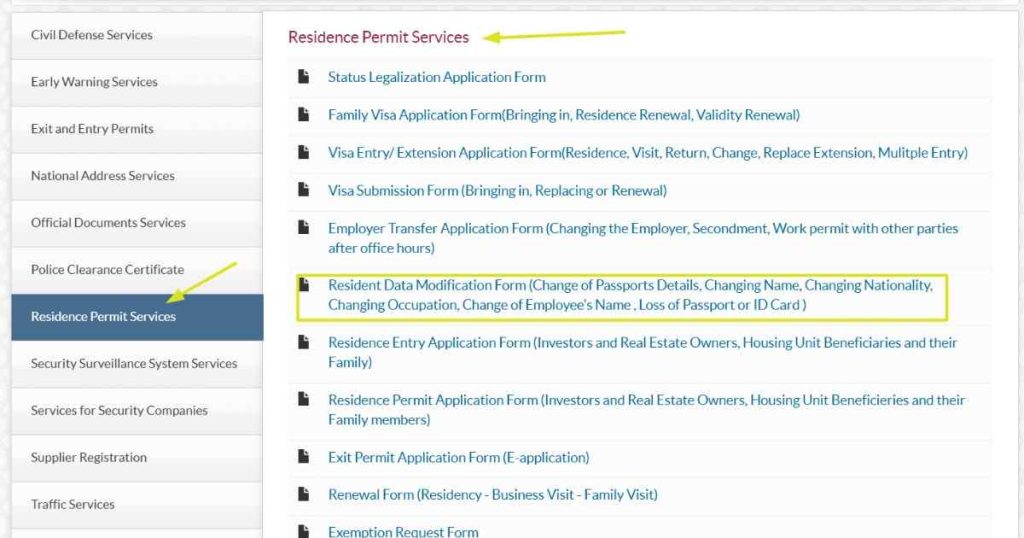
Inside Residence Permit Services, look for the “Resident Data Modification Form”. This is the official form used for reporting a lost QID. It also covers lost passports and personal data changes. Select it to proceed.
Resident Data Modification Form
Step 5: Fill In Your Personal and QID Details
Enter your 11-digit QID number accurately in the required field. Then fill in your passport details as requested. Double-check every entry before moving forward. Any mismatch with MOI Qatar records will cause your request to be rejected or delayed.
Ensure your details match exactly what is on your QID and passport.
Step 6: Explain the Loss
In the form, you will find fields for your loss report number and date of report from the Qatar Police. If you have these details, enter them accurately. If you have not filed a police report yet, briefly explain how and where you lost your QID.
Step 7: Submit Your Report
Review all your entered details one final time. After putting all the detail, print the application form, attach all the required documents and submit to any nearby MOI service center.
How to Report a Lost QID Using the Metrash App
The Metrash app is the fastest official way to report a lost Qatar ID. It is developed by MOI Qatar and gives you access to over 300 government services directly from your phone. Follow these seven steps to report your lost QID quickly and accurately.
Important 2026 Update: The original Metrash2 app was officially discontinued on March 1, 2025. The updated app is now simply called Metrash. Always download the official version from Google Play Store or Apple App Store— verify the developer is Ministry of Interior, Qatar before installing.
Step 1: Install the Official Metrash App
Open the Google Play Store on Android or the Apple App Store on iPhone. Search for “Metrash” — the official app by Ministry of Interior, Qatar. Tap Install or Get and wait for the download to finish. Do not download from any unofficial or third-party website as this risks your device security.
Step 2: Verify Your Identity and Sign In
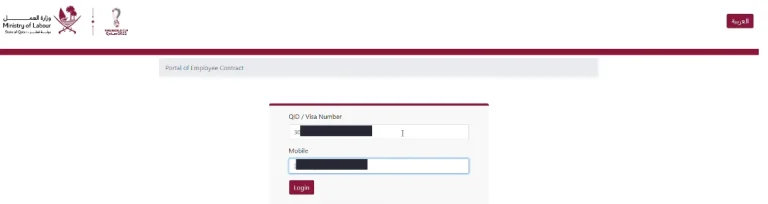
Open the Metrash app after installation. Enter your 11-digit QID number and your registered Qatari mobile number. You will receive a one-time password (OTP) via SMS. Enter the OTP to verify your identity. Then set or enter your PIN to complete the login process and access your account.
Your mobile number must be registered under your QID with your telecom provider (Ooredooor Vodafone Qatar). If not registered, visit your nearest MOI Service Center to update your number first.
Step 3: Open the Residency Services Section
On the app home screen, look for the Residency section. Tap it to open all residency-related services. This section manages your Qatar ID status, residency permit, lost or damaged documents, and passport update requests. All QID replacement services are found inside this section.
Section names inside the app may update with new releases. Always use the latest version of the Metrashapp for accurate navigation.
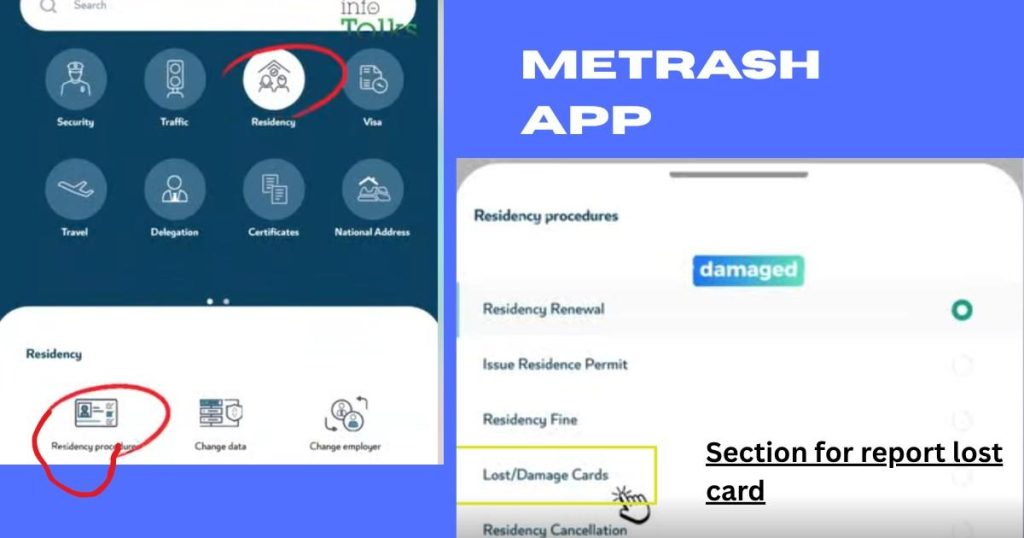
Step 4: Select the Lost ID Reporting Option
Inside the Residency section, select the option to report a lost or damaged ID. This is typically labelled as “Lost/Damage Cards” . Tap on it to begin the official loss report process directly through the MOI Qatar system.
The exact label for this option may differ based on the app version.
Step 5: Provide Details
Enter your 11-digit QID number accurately in the required field. Provide details about how and where you lost your Qatar ID. If you have a loss report number from Qatar Police, enter it here. Also enter your passport details as requested. Double-check all information before moving to the next step.
Any mismatch between your details and MOI Qatarrecords will delay or reject your application. Ensure all details exactly match your official documents.
Step 6: Pay the Replacement Fee Securely
After completing your details, you will be directed to the payment screen. The standard replacement fee is QR 200 as per MOI Qatar. Pay using a credit card or debit card through the app’s secure payment gateway. The Metrash app also supports e-wallet payment options for faster transactions. Save your payment receipt after completing the transaction.
Step 7: Submit Application
After payment, review all your entered details one final time. Tap the Submit button to send your lost QID report to MOI Qatar. You will receive a confirmation notification on your phone. Track your replacement QID application status anytime through the Metrash app under “Application Status” or “Follow Up” section.
In-Person Reporting at MOI Service Centers
Prefer face-to-face help? Visiting an MOI Service Center is a reliable option. It suits those without internet access or needing personal guidance. MOI Qatar operates service centers across Qatar including Doha, Al Wakrah, Al Rayyan, Al Gharrafa, Al Khor, Mesaimeer, and Dukhan. Follow these four steps carefully.
Step 1: Head to Your Nearest MOI Service Center
Go to your nearest MOI Service Center in Qatar. Most centers open from 7:00 AM to 12:30 PM, Sunday to Thursday. Carry these documents with you:
- Your original passport
- A copy of your QID if available
- Your police report or loss report number if already filed
- One recent passport-size photo
Inform the reception staff that you are there to report a lost QID. They will direct you to the correct counter. No prior online appointment is needed for this service at most centers.
Working hours and document requirements may vary by location.
Step 2: Fill Out the Lost ID Report Form
At the counter, request the Lost ID Report form. Fill in all required fields accurately including your full name, 11-digit QID number, passport number, and details of how and where you lost your Qatar ID. If you have a loss report number from Qatar Police, include it in the form. Staff at the center can guide you through each field if needed. Do not leave any field blank. Double-check all entries before handing the form to the staff member.
Step 3: Make Payment at the Counter
After submitting your completed form, you will be directed to the payment counter. The standard replacement fee for a lost QID is QR 200 as per MOI Qatar. Payment at MOI Service Centers is accepted by credit card or debit card only. Cash payments are not accepted at service centers. If you choose Qatar Post home delivery for your new QID, an additional QR 20 fee applies. Pay the full amount and wait for confirmation from the staff.
Step 4: Retain Receipt
After successful payment, the staff will give you an official payment receipt and a submission slip. Keep both documents safe. The submission slip is your proof that your lost QID report has been officially filed with MOI Qatar. You will need it to track your replacement QID application status. You can follow up using the Metrash app under Application Status or visit the same MOI Service Center. Your new QID will be ready for collection or Qatar Post home delivery within 3 to 7 days based on available sources.
How to Apply for a Qatar ID Replacement
Once you have reported your lost Qatar ID, the next step is applying for your replacement QID. You must complete the report first. MOI Qatar will not issue a replacement without a confirmed loss report. You can apply through the Metrash app, portal.moi.gov.qa, or in person at an MOI Service Center. Follow these seven steps carefully.
You must be physically present inside Qatar while applying for a replacement QID.
Step 1: Initiate Replacement
After your loss is reported, open the Metrash app or visit portal.moi.gov.qa. On the Metrash app, go to Residency and select “Replace Damaged or Lost ID”. On the MOI portal, navigate to Residence Services then select “Replacement for lost or damaged residence permit”. Choose “Replace Lost” as your service type. This officially begins your replacement QID application with MOI Qatar.
If your employer or PRO manages your QID, they can also initiate this step on your behalf through their company account on portal.moi.gov.qa.
Step 2: Provide Information
Enter the following details accurately in the replacement application form:
- Your 11-digit QID number
- Your full passport number and details
- Your loss report number or loss report reference from Qatar Police or MOI Qatar
- Your registered mobile number linked to your QID
- Details of the expat or family member if applying on behalf of a dependent
Double-check every entry. Any mismatch with your MOI Qatar records will cause an automatic delay or rejection of your replacement QID application.
Step 3: Attach Your Required Documents
When prompted, upload clear scanned copies of the following documents:
- Your original passport with a valid Qatar residence visa stamp
- A recent passport-size photo meeting official specifications
- Your loss report or police report reference if available
- A sponsorship letter from your employer or sponsor if required for your residency category
- QAR 200 FEE RECEIPT
Make sure all scanned files are clear and fully readable. Blurry or incomplete uploads will delay your replacement QID processing by MOI Qatar.
Step 4: Pay Replacement Fee
Once your documents are submitted, you will reach the payment screen. Pay the standard replacement fee of QR 200 as confirmed by multiple Qatar sources. Use a credit card or debit card for online payment. The Metrash app also accepts e-wallet payments. If applying in person at an MOI Service Center, payment is by credit card or debit card only. Cash is not accepted. Always save your payment receipt as official proof of your application.
Step 5: Choose Delivery Method
After payment, MOI Qatar gives you two delivery options for your new QID:
- Option 1 — Self Collection: Collect your new QID in person from the Expatriates Affairs Department or your nearest MOI Service Center. This is free of charge.
- Option 2 — Home Delivery: Receive your new QID by courier through Qatar Post to your registered address. An additional fee of QR 20 applies. Enter your delivery address accurately and tick the address validity checkbox before confirming.
Choose the option that suits your situation and confirm your selection before final submission.
Step 6: Monitor Your Application Progress
After submission, track your replacement QID application at any time using these methods:
- Metrash app: Go to “Application Status” or “Follow Up” section and enter your application reference number
- MOI portal: Visit portal.moi.gov.qa, go to Inquiries then Official Documents and enter your 11-digit QID number
- MOI helpline: Call 2366666 inside Qatar for a status update from MOI Qatar staff directly
Check your application status regularly. Processing typically takes 3 to 7 days based on multiple Qatar-based sources. Keep your passport with you as alternate identification during this waiting period.
Step 7: Receive New ID
Once your replacement QID is ready, MOI Qatar will notify you by SMS or through the Metrash app. If you chose self collection, visit the Expatriates Affairs Department or your selected MOI Service Center with your passport and payment receipt. If you chose home delivery, your new QID will arrive via Qatar Post to your registered address. Your replacement QID will carry the same expiry date as your original card. Verify all details on the new card immediately upon receipt. Report any error to MOI Qatar without delay.
Always check the new card details carefully on receipt.
Lost Your QID Outside Qatar? Here Is What to Do
Losing your Qatar ID outside Qatar is serious. You cannot re-enter Qatar without proof of your residency permit. You also cannot apply for a replacement QID from abroad. You must first obtain a return permit issued by MOI Qatar through your sponsor. Act fast and follow these five steps precisely.
Step 1: Reach Out to Your Sponsor Immediately
The moment you discover your Qatar ID is lost abroad, contact your sponsor or employer immediately. This is your most urgent first action. Share all details with them including:
- Your full name and 11-digit QID number
- Where and when you believe you lost the QID
- A copy of your passport details
- A police report or loss certificate filed with local authorities abroad if available
If you are under company sponsorship, inform your HR department or PRO right away. They are responsible for initiating the return permit process on your behalf. Do not attempt to travel to Qatar without this permit as you will be denied boarding at your departure airport.
Step 2: Sponsor Applies for a Return Permit
Your sponsor must apply for a return permit on your behalf through MOI Qatar. They cannot delegate this to you while you are abroad. Your residency permit must still be valid at the time of application. The return permit cannot be issued if your Qatar ID or residency permit has already expired.
Your sponsor can apply using two official methods:
Via Metrash app:
- Log in to the Metrash app using the sponsor’s credentials
- Navigate to “Leave Notification” then select “Return Permit”
- Select your name from the sponsored persons list
- Choose “Lost ID Card” as the reason
- Upload required documents in PDF or JPEG format
- Pay the applicable return permit fee by credit card or debit card
- Submit the application and save the acknowledgement receipt
Via portal.moi.gov.qa:
- Log in using the sponsor’s account credentials
- Go to “Residency Services” then click “Issue Return Permit”
- Enter your QID number and select “Lost ID Card” as the reason
- Fill in all required details and upload documents
- Pay the fee online and print the acknowledgement receipt
Via MOI Service Center (in person by sponsor):
- Visit the nearest MOI Service Center in Qatar
- Submit the application form with a copy of your passport and the sponsor’s QID
- Pay the fee by credit card or debit card at the counter
Return permit fees vary by sponsorship type and duration of absence. Based on verified Qatar sources: QR 200if absent less than 6 months, QR 500if absent more than 6 months. Always confirm current fees.
Step 3: Get Your Approved Return Permit
Once your sponsor submits the application and MOI Qatar approves it, the return permit will be issued electronically. Processing typically takes 1 to 3 working days based on multiple verified Qatar sources. Your sponsor will receive the approved return permit digitally through the MOI portal or Metrash app. They must then send this document to you abroad via email or any secure method.
Important points about your return permit:
- It is a temporary document valid for a limited period — usually 14 to 30 days
- You must return to Qatar within the validity period printed on the permit
- If you do not return within this period you will need to apply for a new permit
- Keep a printed copy of the return permit with you at all times during travel
- Some airlines may also accept a digital copy alongside your passport for boarding
Step 4: Airport Procedure
When you arrive at Hamad International Airport in Doha, do not proceed through normal immigration. Follow these steps upon arrival:
- Present your passport and your return permit to the airline check-in staff at your departure airport before boarding. Some airlines require sight of the return permit before allowing you to board.
- Upon landing at Hamad International Airport, proceed to the immigration counter and present your passport and return permit to the immigration officer
- Inform the officer that your Qatar ID was lost abroad
- Your Qatar ID will be officially marked as lost in the MOI Qatar immigration system at this stage
- You may be directed to the Expatriates Affairs Department counter inside the airport to complete formalities
- If your residency permit is still valid and you have been outside Qatar for less than 6 months, you may also apply for a return permit on arrival at Hamad International Airport directly without prior sponsor involvement — conditions apply
The on-arrival return permit option is subject to strict conditions including valid residency and less than 6 months absence. This information is based on an official MOI Qatar communication.
Step 5: Replace ID After Return
Once you are back inside Qatar, you can begin the replacement QID process. Your Qatar ID was marked as lost upon your airport entry. Follow these actions immediately after returning:
- Visit the Expatriates Affairs Department or your nearest MOI Service Center with your passport and return permit
- Your sponsor, employer, or PRO can assist in submitting the replacement QID application on your behalf
- Apply through the Metrash app under Residency then “Replace Damaged or Lost ID” or via portal.moi.gov.qa under Residence Services
- Pay the standard replacement fee of QR 200 by credit card or debit card
- Choose your delivery method — self collection from an MOI Service Center or home delivery via Qatar Post for an additional QR 20
- Your replacement QID will carry the same expiry date as your original card
- Track your application status through the Metrash app under “Application Status”
Processing Time for a New Qatar ID Card
After applying for your replacement QID, knowing what to expect helps reduce stress. Processing time varies based on how you applied and your individual circumstances. Based on multiple verified Qatar sources, MOI Qatar typically processes a lost QID replacement within 3 to 7 working days for online applications. In-person applications at an MOI Service Center may take up to 7 to 10 working days. These are estimates only and not a guaranteed timeline.
Factors That Can Slow Down Approval
Several things can delay your replacement QID approval. Being aware of them helps you avoid unnecessary waiting. The most common delay causes include:
- Document mismatch — Any difference between your submitted details and your MOI Qatar records will trigger a manual review and delay approval immediately
- Incomplete application — Missing fields, unsigned forms, or missing the loss report number will cause your application to be returned for correction
- Blurry or invalid uploads — Unreadable scanned copies of your passport or passport-size photo will be rejected by the system
- Public holidays and peak periods — MOI Qatar offices operate on weekdays only. Applying before a public holiday or during high-volume periods adds extra days to your processing time
- Pending fines or violations — Outstanding MOI Qatar fines linked to your QID may block your replacement QID application from progressing until they are cleared
- Sponsorship issues — If your sponsor or employer has not confirmed or co-signed your application where required, processing will be paused
- Incorrect mobile number — If your registered mobile number is not linked correctly to your QID in the MOI Qatar system, you will not receive SMS updates and may miss critical notifications
How to Check Application Progress
You do not need to visit an office to check your replacement QID status. MOI Qatar provides three official ways to track your application progress:
Via Metrash app:
- Open the Metrash app and log in with your QID number and PIN
- Tap “Application Status” or “Follow Up” from the home screen
- Enter your application reference number from your submission receipt
- Your current application status will display in real time
Via portal.moi.gov.qa:
- Open your browser and go to portal.moi.gov.qa
- Click on “Inquiries” from the top menu
- Select “Other Inquiries“ then click “Official Documents”
- Enter your 11-digit QID number and complete the captcha
- Click “Search” to view your current QID status
Via MOI helpline:
- Call 2366666 inside Qatar during working hours
- Provide your QID number and application reference number
- A MOI Qatar staff member will confirm your application status directly
Check your status at least once every two days during the processing period. Do not submit duplicate applications as this may delay your replacement QID further.
When You Can Expect SMS or a Notification
MOI Qatar will notify you automatically when your replacement QID is ready. Notifications are sent through two official channels:
SMS notification:
- You will receive an SMS to your registered mobile number linked to your QID once the card is approved and ready
- This message confirms whether your replacement QID is ready for self collection at your selected MOI Service Center or dispatched via Qatar Post for home delivery
- If you do not receive an SMS within the expected processing window, check that your mobile number is correctly registered under your QID in the MOI Qatar system
Metrash app notification:
- The Metrash app sends an in-app push notification when your replacement QID status changes
- Make sure push notifications are enabled for the Metrash app on your phone
- Check the “Application Status” section regularly even if you have not received a notification
Tips to Prevent Losing Your Qatar ID Again
- Pick a fixed spot: Choose one dedicated place for your Qatar ID — a specific wallet slot or a card sleeve — and always return it there without exception.
- Keep it on you: Attach your ID to a lanyard or badge clip when you are out, so it stays on your person rather than sitting loose in a bag or pocket.
- Save a digital copy: Take a clear photo of your Qatar ID and store it securely on your phone through an official platform like the Metrash app for quick reference when needed.
- Do a quick check before leaving: Make it a habit to confirm your ID is with you before walking out of any location — home, office, or restaurant.
- Note down your ID details: Write your QID number and key personal details in a secure, password-protected note on your phone in case you ever need them urgently.
- Stay alert in busy areas: Crowded places like malls, airports, and public transport are where items go missing most. Stay mindful of your belongings in these environments.
End Note
Recovering a lost Qatar ID is simpler than most people expect. MOI Qatar provides multiple ways to report and replace your QID — online, through the Metrash app, or in person. Follow the steps in this guide, keep your documents ready, and you will have your replacement card without unnecessary stress. And going forward, a few simple habits can make sure it never happens again.
What to do if I lost my Qatar ID?
Report it to the nearest police station immediately, flag it on the Metrash app, notify your bank and employer, then apply for a replacement at portal.moi.gov.qa or any MOI Service Center.
How much is the replacement of Qatar ID?
QR 200 standard fee. An extra QR 20 applies for Qatar Post home delivery. Credit or debit card only — no cash accepted.
How to get a new Qatar ID?
File a police report, then apply through the Metrash app or portal.moi.gov.qa under Residence Permit Services. Submit your passport, loss report, and photo. Your new QID arrives within 3 to 7 working days.
Is it possible to renew QID outside Qatar?
No. Your sponsor must apply for a return permit from Qatar. Once you return, you can apply for the replacement inside Qatar.
Can I use the Metrash app if I lost my Qatar ID outside Qatar?
You can log in and check your status, but the full replacement process can only be completed once you are physically inside Qatar.
Will I get the same QID number after replacement?
Yes. Your QID number, expiry date, and residency details remain exactly the same. Only a new physical card is issued.
Can someone misuse my lost Qatar ID?
Yes. Report it immediately to police and MOI Qatar, and notify your bank to protect your accounts from unauthorized use.